

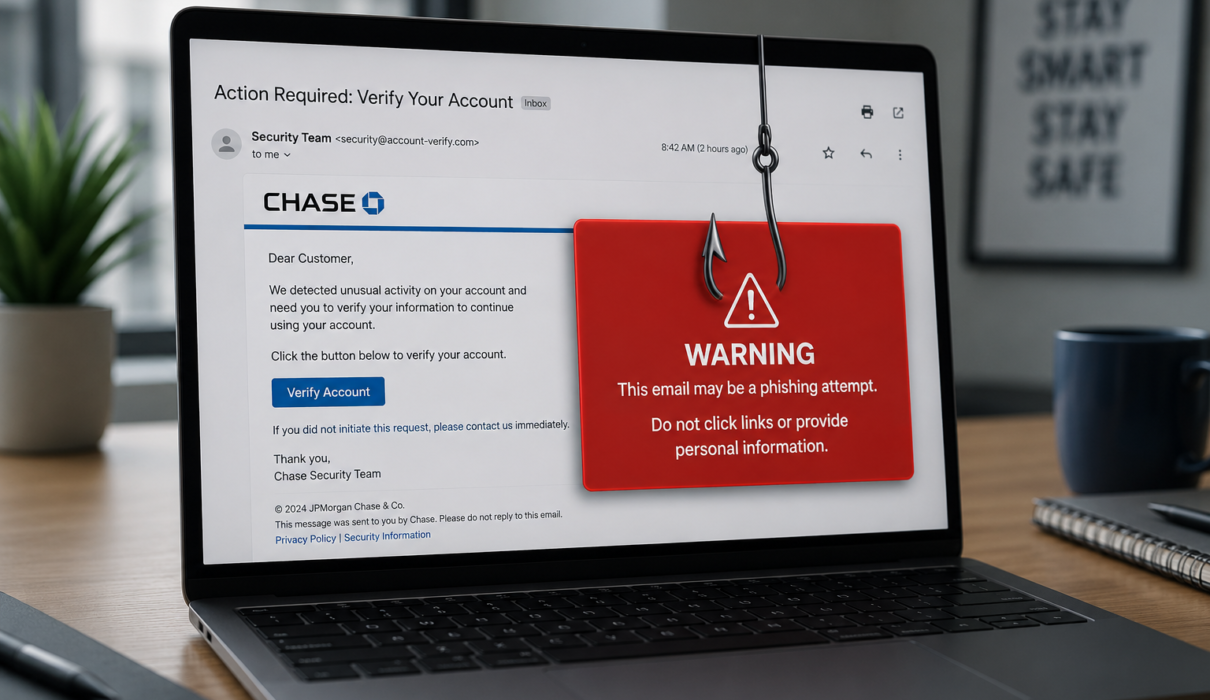
Hook: Why phishing still works — and why you should care
Every day attackers cast millions of digital ‘hooks’ hoping someone will bite. Phishing remains one of the simplest and most effective cyberattacks because it targets people, not just systems. Whether you’re a home user checking email or a security lead protecting a company, understanding phishing is the best defense. In this guide you’ll find clear examples, step-by-step prevention techniques, and practical response actions for individuals and organizations.
What is phishing?
Phishing is a type of social engineering attack where an attacker impersonates a trusted person or organization to trick victims into revealing sensitive information, clicking malicious links, or installing malware. While most people think of email phishing, attack vectors include SMS (smishing), phone calls (vishing), social media messages, and fraudulent websites.
Common phishing goals
- Steal credentials (usernames, passwords, MFA tokens)
- Harvest personal data for identity theft
- Deliver ransomware or other malware
- Trick employees into sending money or confidential files
- Create backdoors for long-term access
Phishing types and examples
Attackers use several variations of phishing. Knowing the differences helps you spot attacks quickly.
Email phishing
The most common form. An email pretends to be from a bank, vendor, or colleague and asks you to click a link or open an attachment.
Spear phishing
A targeted form where the attacker researches a specific individual or company to craft a believable message. Spear phishing is common in business email compromise (BEC) scams.
Whaling
Targeted attacks against high-value targets (C-level executives, finance leads) aiming for large payouts or sensitive access.
Smishing and vishing
Smishing uses SMS/text messages; vishing uses phone calls. Both impersonate trusted entities with urgent requests.
Clone phishing and business email compromise
Clone phishing copies a legitimate email previously sent and modifies content or attachments to include malicious links. BEC uses social engineering and compromised accounts to request wire transfers or data.
Real-world phishing examples
- An email appears to be from a cloud provider asking you to ‘verify your billing details’ via a link that leads to a spoofed login page.
- A text message claims there’s a problem with a package delivery and asks you to confirm a payment method.
- A CFO receives a request from a ‘CEO’ (spoofed account) to urgently wire funds to a vendor.
- A job seeker gets a LinkedIn message with a PDF attachment that installs malware when opened.
How to spot phishing attempts: practical red flags
Not every suspicious message is easy to spot, but many include telltale signs. Train yourself and your team to look for these red flags.
- Unexpected requests for sensitive information or immediate action
- Poor grammar, awkward phrasing, or unusual salutations
- Sender email doesn’t match the displayed name or uses a domain that mimics the real one (ex: ‘paypa1.com’)
- Generic greetings like ‘Dear Customer’ instead of your name
- Links that don’t match the displayed URL; hovering reveals a different domain
- Unsolicited attachments, especially .zip, .exe, or Office macros
- Pressure tactics: threats, expiration countdowns, or urgent demands
Step-by-step prevention strategies
Prevention combines technical controls with human awareness. Use layered defenses to reduce risk.
For individuals
- Enable multi-factor authentication (MFA) on all accounts where available.
- Use a password manager to create and store unique, strong passwords.
- Check links before clicking: hover to preview the actual URL or long-press on mobile.
- Avoid entering credentials on sites reached from unsolicited links—navigate manually instead.
- Keep devices and apps up to date to patch known vulnerabilities.
- Be skeptical of urgent requests for money or personal data no matter the sender.
For organizations
- Deploy email security tools: spam filters, anti-phishing engines, and URL rewriting with safe browsing checks.
- Enable DMARC, DKIM, and SPF to reduce email spoofing and improve domain protection.
- Enforce strong MFA and adaptive authentication for critical systems and remote access.
- Implement least privilege access and regular access reviews.
- Run simulated phishing tests and regular security awareness training tailored to roles.
- Monitor for abnormal behaviors and have logging/alerting for suspicious login attempts.
- Create and maintain an incident response plan with defined escalation paths.
Tools and technologies that help detect phishing
Use a combination of endpoint, network, and cloud-based tools to reduce exposure.
- Email gateways and secure email services with attachment sandboxing
- Web gateway or secure web proxy that inspects and blocks malicious URLs
- Endpoint detection and response (EDR) to spot malicious activity from compromised endpoints
- Threat intelligence feeds to update protections with the latest phishing domains and indicators
- Identity and access management (IAM) with conditional access controls
How to respond if you or your business is targeted
Quick, measured action reduces damage. Here’s a practical incident checklist.
Immediate steps
- Don’t interact further with the suspected message.
- Disconnect the affected device from the network if malware is suspected.
- Change passwords for compromised accounts and revoke active sessions.
- Enable or reconfigure MFA if it was bypassed.
- Preserve logs and evidence for investigation.
Post-incident actions
- Scan and clean infected systems; restore from known good backups if necessary.
- Notify affected parties and regulators if required by law or policy.
- Analyze how the phishing succeeded and update controls/training to close gaps.
- Consider engaging incident response professionals for complex breaches.
Training and culture: the human firewall
Technology helps, but people create the strongest defense when they’re informed and encouraged to report suspicious activity.
- Run periodic, realistic phishing simulations to measure and improve detection rates.
- Provide immediate feedback and short, practical training after simulations.
- Create an easy reporting mechanism for suspected phishing (one-click report buttons in email clients).
- Celebrate improvements and avoid punitive reactions to mistakes; create a learning culture.
Legal and compliance considerations
Depending on the data involved, phishing incidents can trigger breach notification laws, contractual obligations, and regulatory fines. Keep documentation of response actions and consult legal counsel for reporting requirements.
FAQ: Common questions about phishing
Q: How do phishing attacks start?
A: Most begin with a carefully crafted message delivered by email, SMS, or social platform. Attackers may use stolen credentials, scraped public data, or purchased lists to make the message appear legitimate.
Q: Can anti-virus software stop phishing?
A: Antivirus helps with known malware but is not enough. Modern phishing often uses credential theft via fake websites, which requires email security, web filtering, MFA, and user training.
Q: Is MFA foolproof?
A: No security control is 100% effective. MFA significantly reduces risk but can be bypassed in advanced attacks (e.g., MFA fatigue, real-time phishing proxies). Combine MFA with monitoring, conditional access, and phishing-resistant methods (hardware keys, FIDO2) where possible.
Q: What should I do if I clicked a phishing link?
A: Immediately disconnect if malware is suspected, change passwords for accounts potentially exposed, enable MFA, scan your device for malware, and report the incident to your IT/security team or service providers.
Q: How often should organizations run phishing simulations?
A: Regularly—quarterly is common for baseline measurement, with more frequent targeted tests for high-risk groups. The goal is continuous improvement, not punishment.
Conclusion: Make phishing prevention part of everyday behavior
Phishing will continue to evolve, but the core defenses remain the same: skepticism, layered technical controls, and ongoing training. Individuals reduce their risk by using MFA, password managers, and cautious clicking. Organizations protect themselves with email security, authentication best practices, simulated training, and an incident response plan. Treat phishing awareness as a continuous program, not a one-time checklist, and you’ll turn people from targets into a human firewall.
Next steps and resources
Start with a few immediate actions: enable MFA, set up SPF/DKIM/DMARC for your domain, and run a beginner-friendly phishing simulation for your team. Use the authoritative resources below to deepen your defenses.
Further reading and authority sources
- CISA: Phishing Guidance and Resources
- FBI IC3: Internet Crime Complaint Center — Phishing trends
- FTC: How to Recognize and Avoid Phishing Scams
- NIST: Digital Identity Guidelines and phishing-related guidance