

Introduction
Managing business finances doesn’t have to be overwhelming. Modern companies rely on digital tools to simplify accounting, and Xero accounting software stands out for its user-friendly interface, cloud-based convenience, and robust features. Whether you’re a small business owner, a freelancer, or an established enterprise, understanding what Xero can do will help you decide if it’s the right choice for your financial operations.
What Is Xero Accounting Software?
An Overview of Cloud Accounting
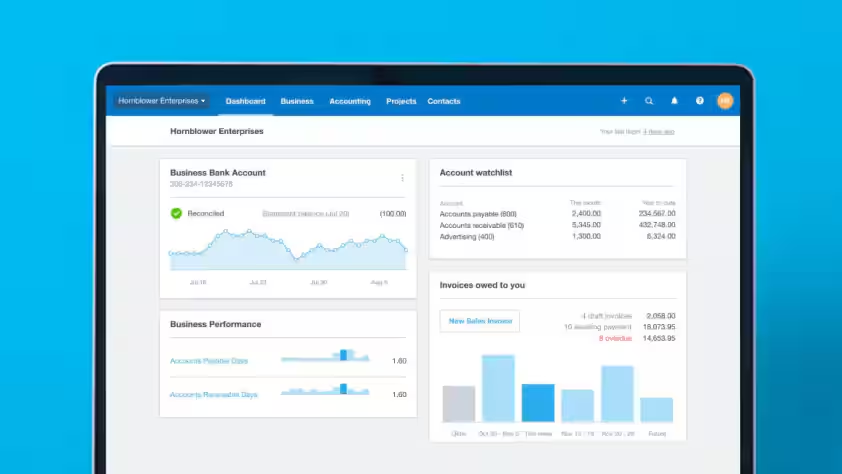
Xero is a globally recognized cloud-based accounting platform designed specifically for small and medium-sized businesses. It provides access to essential financial tools anywhere, anytime, as long as you have an internet connection. Xero accounting software streamlines tasks such as invoicing, bank reconciliation, payroll, and expense tracking, freeing you to focus on your business growth.
How Xero Differs from Traditional Accounting Tools
- Access from any device: Xero’s cloud nature means you can work from your phone, tablet, or laptop.
- Automatic updates: No manual installations—enhancements roll out seamlessly.
- Collaborative access: Your accountant, bookkeeper, and team can all work together in real-time.
Key Features of Xero Accounting Software
Core Accounting Features
- Invoicing: Create and send branded invoices, set up automatic reminders, and accept online payments.
- Bank Reconciliation: Xero securely connects with your bank, automatically imports transactions, and helps you reconcile with a few clicks.
- Expense Management: Track business expenses, attach receipts, and manage reimbursements.
- Payroll: Handle payroll processing and compliance (region dependent).
- Financial Reporting: Generate real-time balance sheets, profit & loss, and cash flow statements.
Advanced Automation and Integration
- Automation: Automate repeating invoices, bank rules, and expense claims to save time and reduce errors.
- Integrations: Connect with over 1,000 third-party apps, including payment platforms, CRM software, inventory management, and more.
Benefits of Using Xero Accounting Software
Why Choose Xero?
- Ease of Use: Intuitive dashboards make financial management approachable for non-accountants.
- Flexible Pricing: Multiple plans for different business needs and budgets.
- Security: Bank-level encryption and frequent backups protect your sensitive data.
- Collaboration: Share access securely with accountants, advisors, and team members.
Real-Time Information
Xero’s cloud system means your data is always current. Decision-makers can instantly see cash flow and outstanding invoices, leading to better-informed choices.
Mobile Access
The Xero app allows you to manage your business on-the-go—raise invoices, reconcile transactions, and attach receipts from your smartphone.
How Does Xero Compare to Other Accounting Software?
Feature Comparison Table: Xero vs. QuickBooks vs. FreshBooks
| Feature | Xero | QuickBooks Online | FreshBooks |
|---|---|---|---|
| Cloud-Based | Yes | Yes | Yes |
| Unlimited Users | Yes (all plans) | No (limits by plan) | No (limits by plan) |
| Inventory Management | Included | Limited (higher plans) | Limited (add-on) |
| App Integrations | 1000+ apps | 750+ apps | 100+ apps |
| Mobile App | iOS/Android | iOS/Android | iOS/Android |
| Reporting | Robust | Robust | Basic |
| Pricing | Flexible | Flexible | Flexible |
Who Should Use Xero?
- Businesses needing real-time collaboration
- Firms requiring unlimited user access
- Companies that benefit from seamless third-party integrations
Practical Applications for Businesses
For Small Business Owners
- Send recurring invoices and reminders for faster payment collection.
- Keep track of sales, expenses, and payroll in one dashboard.
For Accountants & Bookkeepers
- Work collaboratively with multiple clients in real time.
- Access powerful reporting tools for compliance and advisory services.
For Startups & Freelancers
- Low learning curve allows simple setup and onboarding.
- Affordable pricing scales as your business grows.
How to Get Started with Xero Accounting Software
Step-by-Step Onboarding Process
- Sign Up: Choose a plan and create your Xero account.
- Set Up Organization: Input your business details and customize your chart of accounts.
- Connect Bank Accounts: Link your business accounts for automatic transaction import.
- Import Data: Bring in previous financial data from your old system or spreadsheets.
- Invite Collaborators: Enable your accountant, partners, or staff to access the platform.
Tips for a Smooth Transition
- Take advantage of Xero’s help center and guided setup tools.
- Schedule a demo with a Xero certified advisor for personalized training.
Pricing and Plans
Xero Subscription Options
- Starter Plan: Designed for freelancers and micro-businesses, covering basics like invoicing and reconciliation.
- Standard Plan: Suitable for growing businesses with added features like bulk transaction reconciliation.
- Premium Plan: Includes advanced features, multicurrency support, and payroll (varies by region).
Cost Considerations
- No hardware or maintenance costs.
- 30-day free trial for new users.
- Discounted rates for accountants and bookkeepers managing client accounts.
Integration Ecosystem
Popular App Integrations
- Payment platforms: Stripe, PayPal, Square
- E-commerce: Shopify, WooCommerce
- Project management: Trello, Asana
- CRM: HubSpot, Salesforce
Benefits of Integration
- Eliminate manual data entry.
- Improve business intelligence with unified data.
- Simplify compliance and reporting.
Security, Compliance, and Scalability
Security Features
- Multi-factor authentication for account access
- Data encryption in transit and at rest
- Regular security audits
Compliance Support
- Adheres to major data protection laws and standards
- Regional compliance support for payroll and tax filings
Scalability
- Supports growth from sole trader to medium enterprise
- Easily scales users, data, and connected apps
User Reviews and Industry Recognition
What Users Say
- “Xero has significantly reduced my bookkeeping time.”
- “I love the clean design and integration options.”
- “Customer support is responsive and helpful.”
Awards
- Multiple industry awards for cloud accounting excellence
- Trusted by accountants and endorsed by business organizations worldwide
Key Takeaways
- Xero accounting software is ideal for businesses seeking cloud-based financial management.
- It offers real-time collaboration, a broad app ecosystem, and strong automation.
- Flexible pricing, excellent security, and robust support make it a top choice for growth-minded companies.
Frequently Asked Questions
Is Xero accounting software suitable for very small businesses?
Absolutely. Xero’s Starter plan is budget-friendly and covers the core needs of startups, freelancers, and micro-businesses.
Does Xero handle payroll and taxes?
Yes, Xero offers built-in payroll and tax management in select countries. Check their official site for regional features.
Can I import my existing data into Xero?
Xero provides step-by-step import tools to bring in your contacts, accounts, and transaction data with minimal hassle.
Will my accountant be able to access my Xero account?
You can securely invite your accountant or bookkeeper to collaborate, with custom user permissions to control access levels.
How often should I reconcile transactions?
It’s best to reconcile at least weekly—Xero makes this process easy by suggesting matches for your bank transactions.
Conclusion
Xero accounting software has transformed how businesses manage their finances, offering a simple, effective, and collaborative solution. With real-time insights, vast integrations, and world-class security, Xero empowers business owners and finance professionals to make smarter decisions. If you are searching for a comprehensive accounting platform that grows with your business, Xero deserves your consideration.
Ready to take your financial management to the next level? Try Xero accounting software today and discover how it simplifies everyday accounting—so you can focus on what matters most: building your business.